Adjustable Kids Study Desk & Chair Set With Tilt Top
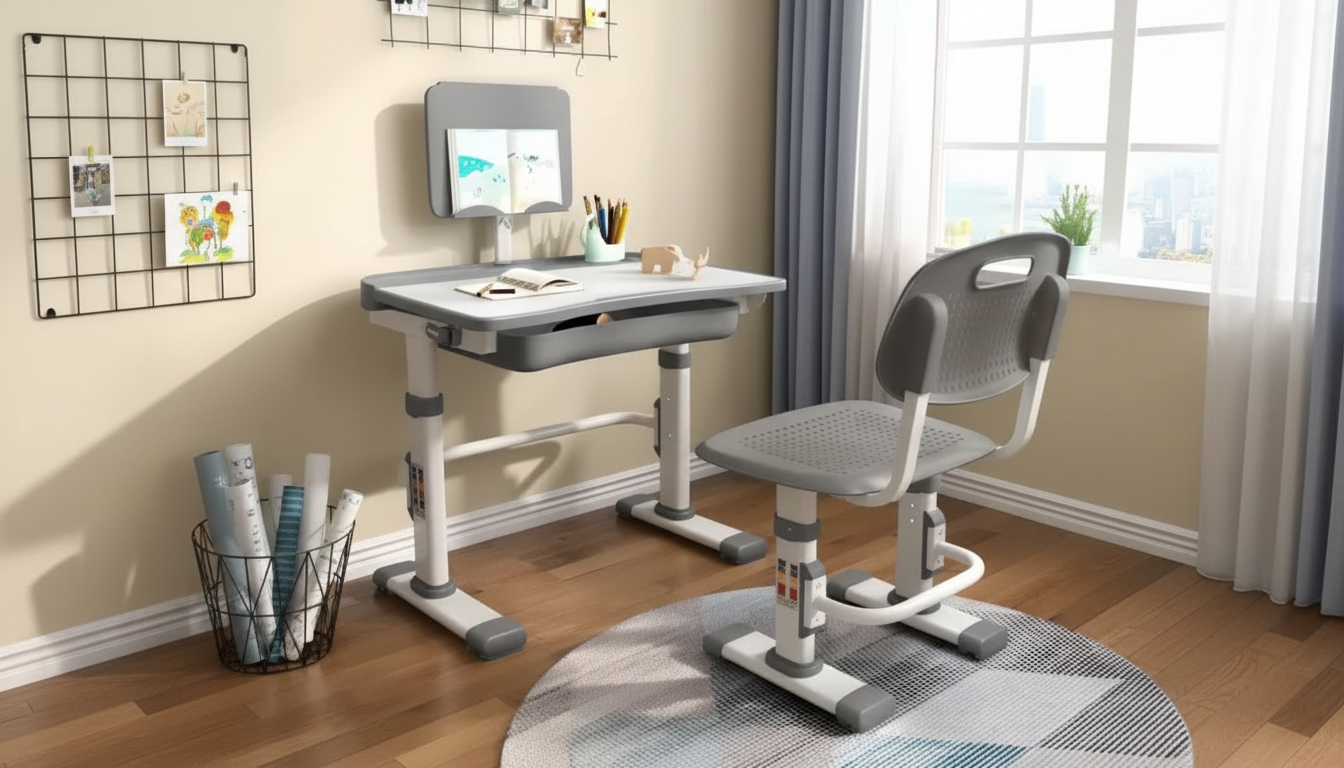
Adjustable Kids Study Desk & Chair Set with Tilt Desktop
A dedicated study spot can make homework, reading, and creative projects feel more comfortable and organized. This adjustable kids desk and chair set pairs a height-adjustable workspace with a tilting desktop to support different activities, from writing and drawing to reading and tablet time. With the right fit and a simple routine, kids are more likely to settle in, focus, and keep supplies from migrating all over the house.
What This Desk & Chair Set Helps With
- Creates a consistent place for schoolwork, crafts, and quiet activities
- Supports a more comfortable posture by matching desk and chair height to the child
- Tilting desktop helps reduce neck bending for reading, drawing, and worksheets
- Keeps essentials together so the study area stays tidy and inviting
Many kids try to do “desk work” at a coffee table or on a bed, which often leads to slouching, awkward wrist angles, and constant shifting. A correctly sized desk-and-chair pairing encourages steadier sitting and makes it easier to set simple expectations: pencils here, books there, backpack nearby.
Standout Features to Look For in Daily Use
- Adjustable desk height: helps the workspace grow with the child over multiple school years
- Adjustable chair height: keeps feet closer to flat on the floor and supports steadier sitting
- Tilt desktop: useful for angled tasks like reading, sketching, and handwriting practice
- Stable base and smooth edges: important for energetic kids and frequent repositioning
- Easy-to-clean surfaces: helpful for markers, glue, snacks, and everyday spills
Tilt is one of the biggest day-to-day upgrades. A flat surface is fine for worksheets, but reading and drawing are often easier when the page is angled toward the child. For families doing a mix of schoolwork and creative projects, a tilting desktop can reduce the “hunched over the page” habit and make longer sessions feel less tiring.
Quick Setup and Room Placement Tips
- Place the desk near natural light when possible; add a task lamp for evening work
- Keep screen devices slightly below eye level if used; take breaks to reduce strain
- Leave enough clearance behind the chair for easy getting in and out
- Use a small bin or organizer nearby for pencils, crayons, and notebooks to reduce desktop clutter
Positioning matters more than most people expect. If the chair constantly bumps a wall or the desk is jammed into a dark corner, kids tend to twist, lean, or abandon the area entirely. A calm, well-lit spot also makes it easier to supervise without hovering—especially during homework time.
For general workstation and posture guidance, see the OSHA Computer Workstations eTool. For broader child posture considerations, visit HealthyChildren.org (American Academy of Pediatrics).
How to Adjust for Comfort (Simple Fit Checks)
- Seat height: aim for knees bent around a right angle and feet supported (floor or footrest)
- Desk height: forearms should rest comfortably while writing without shrugging shoulders
- Tilt angle: use a gentler tilt for writing and a steeper tilt for reading or drawing
- Encourage short posture breaks during longer sessions (stretch, stand, look away from close work)
Comfort Fit Checklist
| Adjustment | Target | Easy Check |
|---|---|---|
| Chair height | Feet supported; knees comfortably bent | Feet can rest flat on the floor (or on a stable foot support) |
| Desk height | Shoulders relaxed; elbows not lifted | Child can write without raising shoulders or leaning far forward |
| Desktop tilt | Better viewing angle for the task | Reading feels easier without hunching over the page |
| Reach | Supplies within comfortable reach | Frequently used items stay on the desk without overreaching |
A quick way to test the setup is to have your child write a few lines, then flip to reading for a minute. If they keep sliding forward, craning their neck, or lifting their shoulders, a small adjustment to chair height, desk height, or tilt angle can make a noticeable difference.
Safety and Durability Considerations
- Check stability on the floor surface; use a rug pad if needed to reduce sliding
- Teach kids to adjust tilt gently and keep fingers away from pinch points during movement
- Avoid overloading the desktop with heavy items; keep weight balanced
- Wipe down regularly and check fasteners occasionally to keep the set secure
Kids tend to lean on edges, push back from the desk, and “park” books in piles. A stable base and routine check of bolts and fasteners helps the set stay solid over time. If the desk sits on hard flooring, adding a non-slip pad can reduce creeping and make the chair feel steadier.
Who This Set Is Best For
Product Option Available
- Adjustable Kids Study Desk & Chair Set with Tilt Desktop: a coordinated desk-and-chair solution designed for everyday study routines and flexible task angles
More In-Stock Picks for Kids
- Kids’ 12V Ride On Land Rover with Remote Control and LED Lights
- High-Speed 1/8 Scale Monster Tank RC Car
- Girls Knit Sweater Dress with Heart Print & Ruffle Collar
FAQ
What is the tilting desktop useful for?
A tilting desktop brings books and pages closer to a comfortable viewing angle, which can make reading, drawing, and coloring feel easier with less neck bending. Use a gentler tilt for writing so the wrist stays comfortable and the paper doesn’t slide.
How do you know if the desk and chair are adjusted correctly?
Look for relaxed shoulders, forearms that can rest comfortably while writing, and feet supported (on the floor or a stable footrest). If your child is hunching, tiptoeing, or lifting their elbows to reach the surface, adjust chair height and desk height until the posture looks more natural.
What age range works best for an adjustable kids desk and chair set?
Adjustability is meant to accommodate a range of ages and heights rather than one specific age. Measure your child and use simple fit checks—feet supported, knees comfortably bent, and shoulders relaxed—to confirm the setup works now and can be readjusted as they grow.










Leave a comment