DIY Orbiting Satellite Kit for Kids: Build a Mini Mission
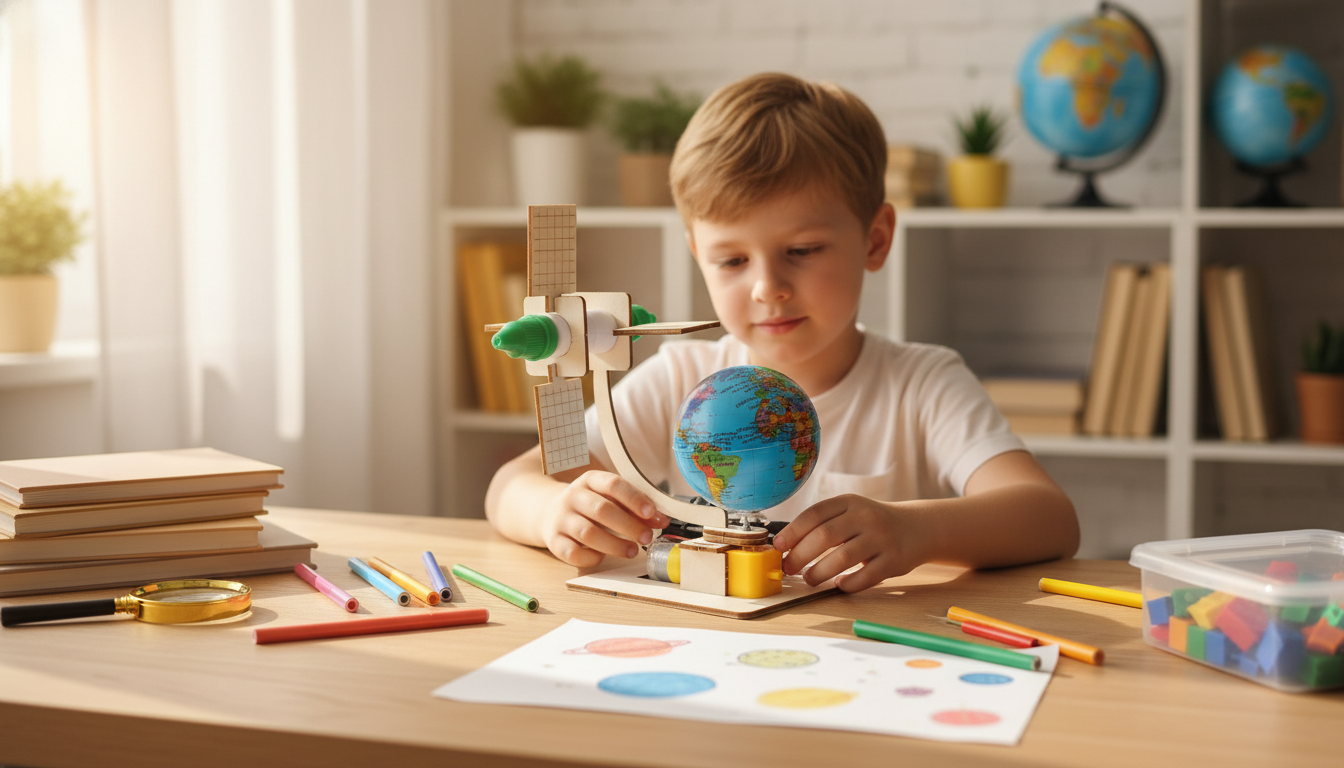
DIY Orbiting Satellite Science Kit for Kids: Build, Learn, and Launch a Mini Space Mission
A hands-on satellite model can turn big space ideas into something kids can build, test, and proudly display. A DIY orbiting satellite science kit blends crafting with simple physics and engineering concepts, making it a fun STEM activity for home, classrooms, clubs, or rainy-day projects. Instead of just reading about space, kids get to “think like a mission team”: identify parts, follow a build sequence, test movement, and make small improvements that change how the finished satellite behaves. For more guidance, see Astronomy and STEM Themed Activities for Kids (Archive).
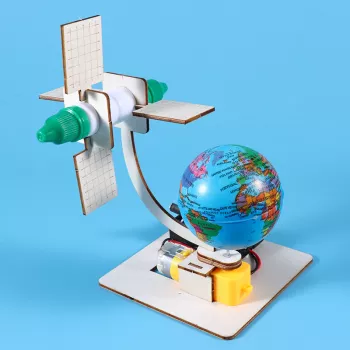
If you’re looking for a ready-to-go project with a space theme, the DIY Orbiting Satellite Science Kit for Kids – Fun STEM Learning Toy is an easy way to bring a mini space mission to the kitchen table or classroom maker station. For further reading, see Space Exploration STEM Activities for Kids – Science Buddies.
What Kids Learn While Building an Orbiting Satellite Model
- Orbits and motion: how objects move around a larger body and why “falling around” can look like orbiting.
- Engineering thinking: following steps, troubleshooting, and improving a build when something doesn’t align.
- Cause and effect: how small changes in assembly can change balance, spin, and stability.
- Vocabulary boosts: satellite, orbit, axis, rotation, and communication—explained in kid-friendly terms.
- Confidence through making: completing a multi-step project and showing it off as a finished model.
To keep the science explanations age-appropriate, it helps to use short comparisons. For example: “Orbit is like always falling, but missing the ground because you’re moving forward fast enough.” NASA’s kid-friendly overview is a solid companion for quick definitions: NASA Space Place — What Is a Satellite?.
What’s Included and What to Prepare
- Kit components: model parts designed to assemble into an orbiting satellite display/activity build.
- Common add-ons to have ready: a clear workspace, kid-safe scissors (if needed), and a small container for tiny pieces.
- Optional extras for extended learning: notebook for observations, colored markers for customization, and a flashlight to simulate sunlight and shadows.
- Adult help tips: support younger builders with reading steps, keeping parts organized, and checking snug connections.
Quick Setup Checklist
| Item | Why it helps | Optional? |
|---|---|---|
| Clear table space | Prevents losing small parts and keeps steps organized | No |
| Small tray or bowl | Holds pieces during assembly | No |
| Markers or stickers | Adds personalization and prompts discussion (panels, antennas, labels) | Yes |
| Notebook + pencil | Encourages predictions, notes, and simple experiment logs | Yes |
| Flashlight | Demonstrates sunlight direction and shadows like day/night cycles | Yes |
A Simple “Mini Mission” Activity Plan (30–60 Minutes)
- Mission briefing: ask what satellites do (communication, weather, navigation, Earth observation).
- Build phase: assemble the model step-by-step, pausing to identify parts (body, panels, antennas).
- Test phase: check stability, alignment, and movement—make one adjustment at a time and observe changes.
- Mission log: write or draw what worked, what was tricky, and one improvement for next time.
- Show-and-tell: explain the build to a parent, sibling, or classmate using three new space words.
For the “briefing,” it’s fun to assign a mission type before building. A weather satellite? A communications relay? An Earth-imaging satellite? The European Space Agency has a clear kid-level introduction you can use to spark ideas: ESA Kids — Satellites.
Ways to Extend the Learning After the Build
- Orbit demo with objects: use a ball and string to talk about circular paths, centripetal force, and why speed matters.
- Earth observation challenge: design a “mission goal” (track storms, map forests, spot city lights) and draw what the satellite would look for.
- Solar power talk: relate solar panels to energy capture, and discuss why satellites need power in space.
- Communication basics: explain how signals travel and why satellites act like relays between places.
- Creative STEM add-on: name the satellite, design a mission patch, and make a simple poster with key facts.
Who This Kit Is Great For
To make the finished build feel “museum-ready,” set up a small display area afterward. A desk organizer can double as a “mission control” cup for pencils, labels, and note cards—try the Creative Hollow Star Desk Organizer – Pen & Brush Holder for Office or Study for a space-themed touch.
Safety and Success Tips for Younger Builders
If your household runs busy, it helps to set a simple build window (and protect it from interruptions). A quick planning tool can make STEM time easier to repeat weekly: Using AI to Organize Kids’ Schedule | Digital Guide for Parents on How to Use AI to Organize Family Schedule.
DIY Orbiting Satellite Science Kit: Product Snapshot
At-a-Glance Details
| Detail | Info |
|---|---|
| Product | DIY Orbiting Satellite Science Kit for Kids – Fun STEM Learning Toy |
| Price | $21.51 USD |
| Availability | In stock |
| Good for | Space-themed STEM building activity, gifts, home or classroom projects |
FAQ
What age is this DIY satellite kit best for?
It’s typically a great fit for elementary-aged kids and up, especially ages 6–12 depending on comfort with small parts and multi-step directions. Younger builders often do best with an adult helping with reading steps and keeping pieces organized, while older kids can usually build more independently.
How long does the build usually take?
Plan for about 30–60 minutes for the main build. Add extra time if kids want to decorate, label parts, or do quick “mission tests” like flashlight sunlight simulations.
Is it more of a toy or a learning activity?
It’s both: a buildable model kids can play with and display, plus a hands-on learning activity that naturally leads to STEM conversations. Pairing it with simple add-ons—like an orbit demo, a solar power chat, or a communication relay explanation—helps connect the model to real satellites.









Leave a comment